 Mostafa Ashraf

Client-Server Model
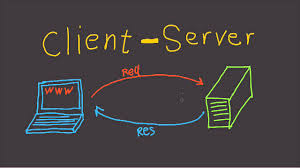
The internet is composed of two kind of devices clients and servers
Clients: request resources and servvices from the serverServer: Provide those resources & services
EX:
when you open your browser(firefox) and visit a web site ,it acts as a client and request web page from web server
Then the server will provide this page to the browser
Domain Name System (DNS)
How do your browser know where to find these resources?
every device connected to the internet has a unique IP
IP addresses are made up of numbers and letters that are hard for humans
to remember. For example
IPv4 looks like this: 123.45.67.89
IPv6 looks even more complicated: 2001:db8::ff00:42:8329
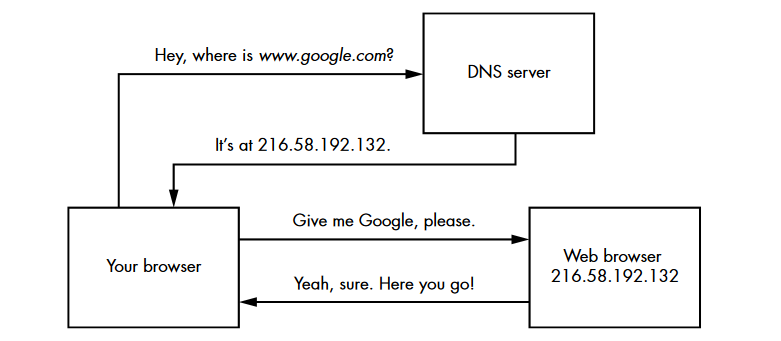
This is where the Domain Name System DNS comes in. Think of a DNS server as the internet’s directory, converting domain names into IP addresses. When you input a domain name into your browser, the DNS server’s job is to translate that name into an IP address. In other words, your browser queries the DNS server, asking, “What is the IP address for this domain?
Internet Ports
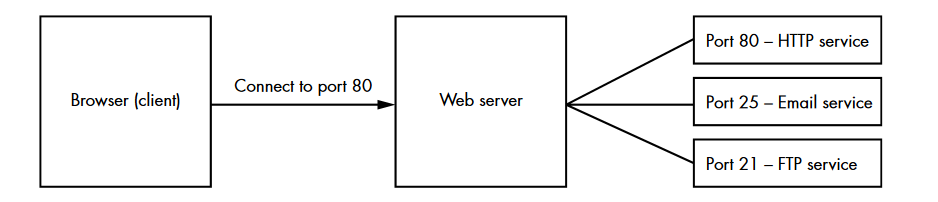
After your browser obtains the correct IP address, it will attempt to connect to that IP address via a port.
So what is port ??
a logical division on devices that identifies a specific network service. We identify ports by their port numbers, which can range from 0 to 65,535
Ports allow a server to provide multiple services to the internet at the same time
HTTP Requests and Responses
Once a connection is established, the browser and server communicate via
the HyperText Transfer ProtocolHTTP.
HTTP is a set of rules that specifies how web clients and web servers should exchange information
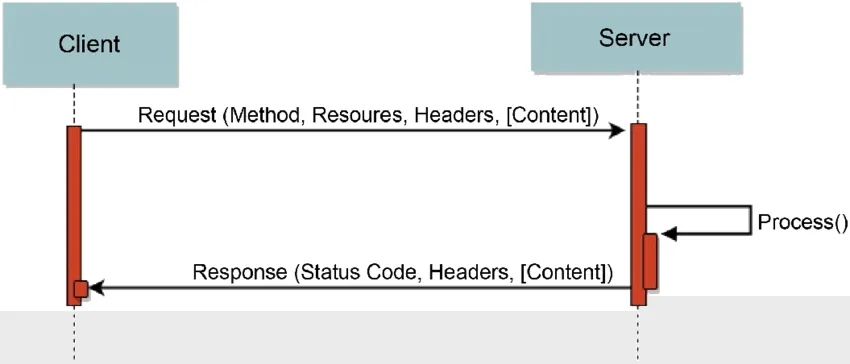
consists of an HTTP request and an HTTP response
let’s start by HTTP request here is an examble we will analisys it
GET / HTTP/1.1
Host: www.google.com
User-Agent: Mozilla/5.0
Accept: text/html,application/xhtml+xml,application/xml
Accept-Language: en-US
Referer: https://mdsec.net/auth/488/Home.ashx
Connection: Keep-Alive
Cookie: SessionId=5B70C71F3FD4968935CDB6682E545476
The first line of every HTTP request consists of three items, separated by spaces:
-
A verb indicating the HTTP method:
GET: To retrieve data from the server
POST: To submit data to the server
PUT: attempts to upload the specified resource to the server
OPTIONS:returns information about the servermethod used - The requested URL.
- The HTTP version being used, Common version
1.0 & 1.1
The rest of the lines are HTTP request headers. These are used to pass
additional information about the request to the server.
The Cookie header: is used to send cookies from the client to the server
HTTP Response
- The first line of an HTTP response contains two fields:
HTTP versionandHTTP response code - The next lines contain HTTP header value similar to an http request
- response body is usually like: HTML code, JSON, scripts or a PDF document hosted on the webserver
HTTP Response Codes
- 2xx: when a request succeeds like
200 OK. - 3xx: when the server redirects the client like
302 Found. - 4xx: when requesting a resource that doesn’t exist or requesting a bad format like
400 Bad Request, 403 Forbidden and 404 Not Found. - 5xx: when there is some problem with HTTP server itself like
500 Internal Server Error
Encoding
Our data can’t be transmitted in the form of plain text.So websites encode their messages to prevent data corruption
there are many ways to encode the data
- Base64 Encoding
make data safelyuser credsby using ASCII charactersEX: Q29udGVudCBFbmNvZGluZw== - Hexadecimal Encoding
representing characters in a base-16 format0 - F - URL Encoding
Each character in a URL-encoded string can be represented by its designated hex number preceded by a % symbolEX: %6c%6f%63%61%6c%
Session Management and HTTP Cookies
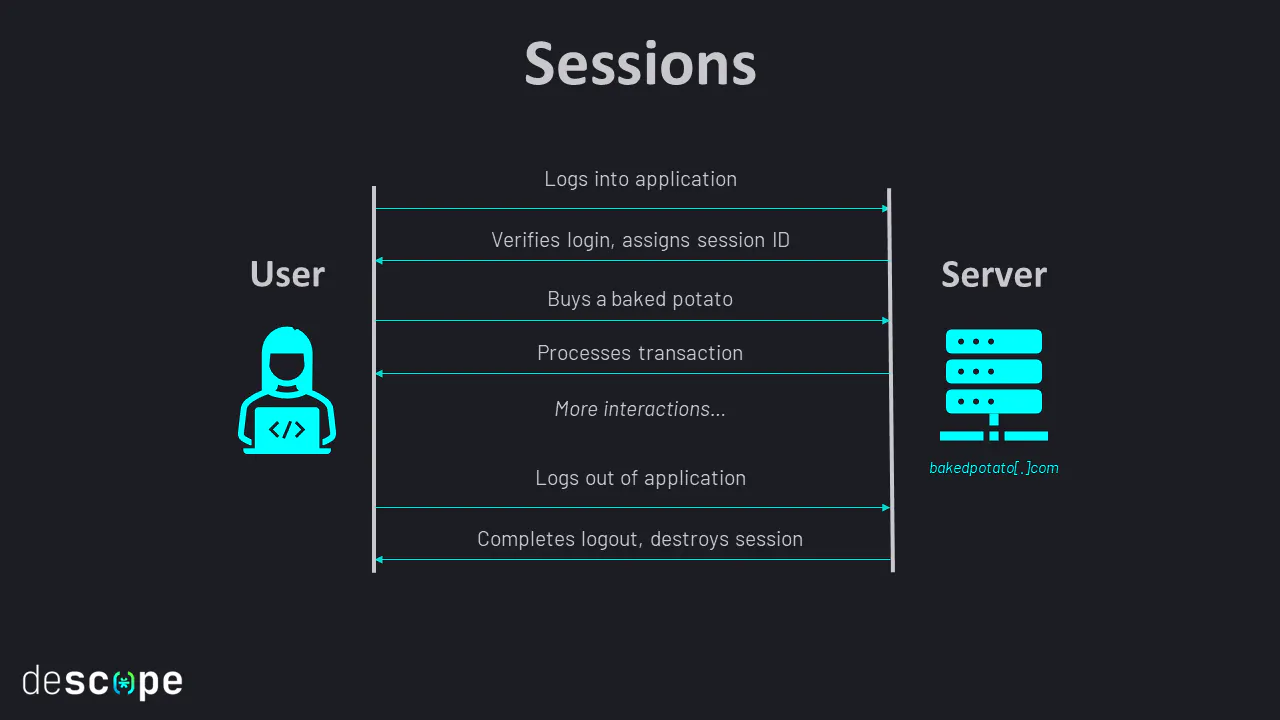
when the user Login to the website a new session starts & server assign session ID for your browser as a Cookie
the user has to re-login every time he close the website tab??
No, because the website remembers his session
Session management: process that allows the server to handle multiple requests from the same user without asking the user to log in again
HTTP Cookies: as we said its the session ID that the server sent it to our browser after login.
After receiving a cookie, your browser stores it and include it in every request to the same server, That’s how the server knows it’s you!
Token-Based Authentication
In session-based authentication, the server stores your information and uses a corresponding session ID to validate your identity.
token-based authentication system stores this info directly in some sort of token. Instead of storing your information server-side and querying it using a session ID.
tokens allow servers to deduce your identity by decoding the token itself.
to protect the tokens from tampering and modification we have two ways
- encrypt the tokens
- use
Signatuers-> userd to verify the integrity of a piece of data
the steps of this process: - the user logs in with their credentials
- server validates those credentials and provides the user with a
signed token. - user sends the token with every request to prove their identity
- Upon receiving and validating the token, the server reads the user’s identity information from the token and responds with confidential data.
JSON Web Tokens JWT
one of the most commonly used types of authentication tokens. It has three components: header, a payload, and a signature
- The header identifies the algorithm used to generate the signature.
{ "alg" : "HS256", "typ" : "JWT" } - The payload section contains information about the user’s identity
{"id": "15", "name": "mostafa"} - the signature section validates that the user hasn’t tampered with
the token. It’s calculated by concatenating the header with the payload
4Hb/6ibbViPOzq9SJflsNGPWSk6B8F6EqVrkNjpXh7M
For this specific token, the signature was generated by signing the string
eyBhbGcgOiBIUzI1NiwgdHlwIDogSldUIH0K.eyB1c2VyX25hbWUgOiBhZG1pbiB9Cg`
with the HS256 algorithm using the secret key. The complete token concatenates each section (the header, payload, and signature), separating them with a period (.):
eyBhbGcgOiBIUzI1NiwgdHlwIDogSldUIH0K.eyB1c2VyX25hbWUgOiBhZG1pbiB9Cg.4Hb/6ibbViPOzq9SJflsNGPWSk6B8F6EqVrkNjpXh7M
But what if implemented incorrectly..??
attacker can bypass the security mechanism and forge arbitrary tokens.
Manipulating the alg Field
Sometimes applications fail to verify a token’s signature after it arrives at
the server. This allows an attacker to simply bypass the security mechanism
by providing an invalid or blank signature:
If the alg field is set to none, even tokens with empty signature sections would be considered valid.
{ "alg" : "none", "typ" : "JWT" } { "user" : "admin" }
two most common types of signing algorithms used for JWTs are HMAC and RSA.
HMAC: requires the token to be signed with a key and then later verified with the same key.
RSA: the token would first be created with a private key, then verified with the corresponding public key, which anyone can read.
Same Origin Policy (SOP)
SOP is : a script from page A can access data from page B only if the
pages are of the same origin (same protocol , same hostname & same port)
but there is like CORS HEADER allow access for some sites
ex: Access control allow origin: siteA.com , siteB.com
this mean that the server told the browser that this site can access data.
Thank you for reading..!